
AI Tattoo Generator for Back Tattoos: Plan Large-Scale Ink
How an AI tattoo generator handles back tattoos — planning a design around the spine and shoulder blades, keeping a large piece balanced, and previewing scale before you commit.
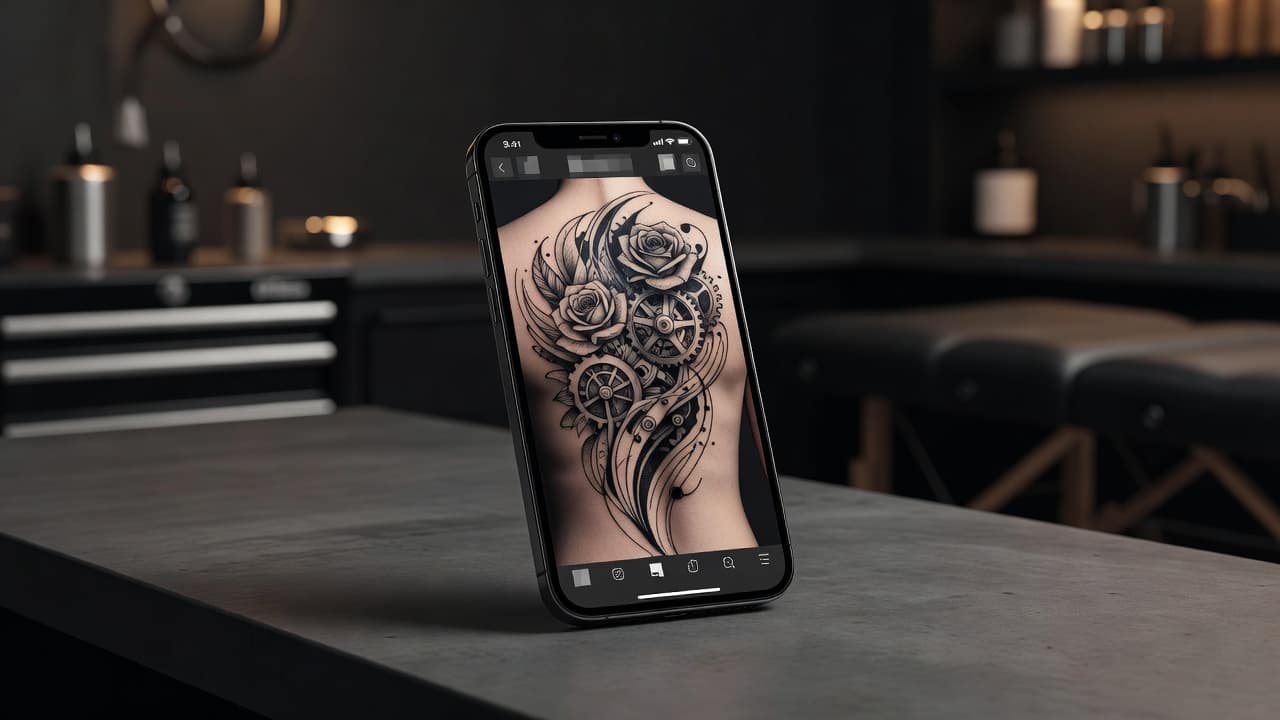
A back tattoo is the biggest canvas most people will ever commit to, and that scale changes everything about how a design needs to work. An AI tattoo generator for back tattoos lets you plan that scale before you're in the chair: describe a full back piece or a single shoulder-blade design, and see how the composition actually holds together across a wide, spine-interrupted canvas instead of guessing from a cropped screen preview.
In short: designing a back tattoo with AI means prompting for the canvas as much as the subject — telling the generator whether you want a full back piece, an upper-back panel, or a shoulder-blade design, and how the spine should factor into the layout. This guide covers how to size a back tattoo design correctly, whether it should be symmetrical, how to prompt for a composition that reads as one piece rather than scattered elements, and what to expect once you take the design to an artist.
Why Back Tattoos Are a Different Design Problem
Most tattoo placements are compact enough that a single subject fills the space naturally. A back tattoo is the opposite problem: the canvas is wide, mostly flat, and split down the middle by the spine, which means a design has to hold together as one composition across a much larger area than a forearm or calf piece ever will. A subject that looks complete on a wrist can look lonely and off-center stretched across an entire back, while a design built for that scale from the start uses the extra space deliberately — layered elements, a clear focal point, and a sense of flow from the shoulders down toward the lower back.
How Does an AI Tattoo Generator Handle Back Tattoos?
An AI tattoo generator renders artwork from your description or an uploaded photo, and for a back piece the most important thing you can specify is the canvas itself — not just the subject, but the shape and proportions of the space it needs to fill. Mentioning "full back piece," "upper back panel," or "single shoulder blade" changes how the AI composes the design, spacing elements to fill a tall, wide area rather than defaulting to a composition sized for a much smaller placement.
In INK, you can describe your idea or start from an uploaded reference photo, specify the back-piece size you're planning, and generate a few options to compare. Because a back tattoo reads very differently at full scale than it does cropped to a square preview image, it helps to picture each variation stretched across an actual back rather than judging it purely as a standalone graphic.

Should a Back Tattoo Be Symmetrical?
Not necessarily, but the spine forces every back design to reckon with symmetry one way or another. Fully symmetrical pieces — wings, a mandala centered on the spine, matching floral clusters on each shoulder blade — are popular precisely because the spine already splits the canvas in two, making mirrored designs feel natural rather than forced. Asymmetrical compositions work just as well, especially pieces that flow diagonally from one shoulder toward the opposite hip, but they need to be prompted deliberately: an AI generator left to its own devices will often default to a centered, symmetrical layout unless you specify otherwise.
Either direction can look striking, but it's worth deciding before you start prompting, since "symmetrical mandala centered on the spine" and "asymmetrical botanical piece flowing from the left shoulder to the right hip" will produce completely different compositions from the same basic subject.
How to Prompt an AI Tattoo Generator for a Back Tattoo
A handful of habits make the difference between a back tattoo prompt that comes back as one coherent piece and one that comes back as a design sized for the wrong canvas:
- State the canvas size first. Specify "full back piece," "upper back," or "single shoulder blade" before describing the subject, so the AI scales the composition correctly.
- Decide how the spine factors in. Tell the AI whether the spine should be a literal center line, a hidden divider, or ignored entirely in favor of a diagonal flow.
- Specify symmetry or asymmetry. Say explicitly whether you want a mirrored, symmetrical design or one that flows unevenly across the back.
- Generate a few full-scale variations. Compare 3-5 versions imagining each one stretched across an actual back rather than viewed as a small square image.
- Refine sections, not the whole piece. If one area feels unbalanced, use an AI tattoo editor to adjust that section rather than regenerating the entire composition.

Subjects That Work Well for a Back Tattoo
Because a back offers so much room, certain subjects and compositions tend to fill it more convincingly than others:
- Wings. A classic full-back layout that naturally mirrors across the spine and uses the shoulder blades as the widest point of the composition.
- Nature scenes. Mountain ranges, forests, or ocean waves scale up naturally, giving the AI room to layer depth and detail across the full width of the back.
- Mandala or geometric centerpieces. A large radial design centered on the upper or lower back reads clearly at scale and holds a strong symmetrical anchor point.
- Mythological or religious figures. Dragons, phoenixes, and deities are frequently chosen for full backs because the elongated canvas suits a single large figure with flowing detail.
- Spine-following linework. A vertical botanical vine, script, or geometric line that runs directly along the spine, using it as a literal design element rather than working around it.
Previewing Placement Across the Back
Because a back piece spans so much surface area, checking how it actually wraps around your shoulders and spine matters more than it does for almost any other placement. A design that looks perfectly proportioned as a flat image can shift unexpectedly once mapped onto the natural curve of the shoulder blades and the dip along the spine. Using AR try-on to preview the generated design directly on your body lets you catch proportion or spacing issues — a focal point sitting too high, an element crowding the shoulder — before you're committed to a multi-session tattoo. Our tattoo try-on technology guide explains how this preview process works.
Our tattoo placement guide covers pain levels and visibility across different back zones in more detail, which is worth reading alongside your design planning since some sections of the back are noticeably more sensitive than others.
From AI Design to a Real Back Tattoo
Once you have a back tattoo design you're happy with, bring a high-resolution export to an artist experienced with large-scale pieces — back tattoos are typically completed across multiple sessions, so you want someone comfortable planning a multi-visit project, not just a single sitting. A skilled artist will adapt the design to your specific body proportions, discuss how the piece should be broken into sessions, and may suggest adjustments so the composition ages well across such a large area of skin.
Ask to see an artist's healed photos of previous back pieces specifically, since large-scale work can behave differently over time than a small tattoo — line weight and shading choices that hold up on a forearm don't always translate directly to a back-sized canvas. A specialist in bigger pieces will know how to adjust for that from the start.
Does a Back Tattoo Need Different Aftercare?
Back tattoos follow the same core aftercare guidance as any other tattoo, but the size and location add practical complications: it's harder to reach and clean on your own, and clothing or bag straps can rub against the healing area more than they would for a smaller, more accessible placement. Our full tattoo aftercare guide covers the healing timeline in detail. If your back piece is done across multiple sessions, expect to repeat the aftercare routine after each one, since every session reopens fresh skin.
The Final Word
An AI tattoo generator for back tattoos won't replace an artist's ability to execute a large-scale piece, but it will help you plan a composition that actually works across that much space before you ever book a session. State the canvas size upfront, decide how the spine factors into the layout, generate a few full-scale variations, and preview the wraparound before you bring your design to an artist who can bring it to life across multiple sittings.
Plan Your Back Tattoo Free in INK
Describe your idea, set the canvas size, and preview the design across your shoulders and spine before you ink. No sign-up needed.
Try INK Free →

Create Your Perfect Tattoo Design
Use AI to generate unique tattoo designs and preview them on your body before committing to ink.
Start Designing for FreeWritten by
INK Team